Description
Take full control of the related products shown on your WooCommerce product pages.
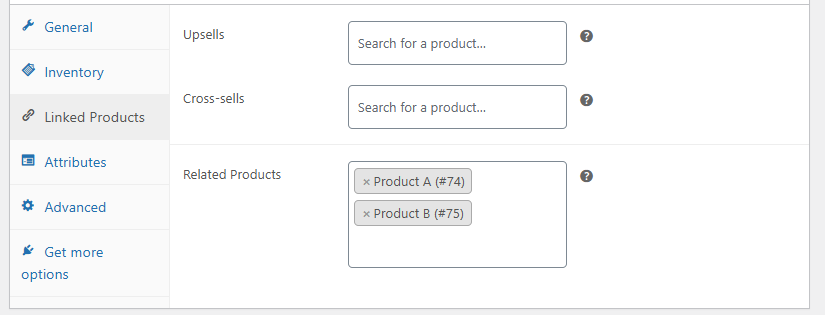
WooCommerce Custom Related Products allows you to manually select which products appear as related items on a per-product basis, completely overriding WooCommerce’s default category- and tag-based logic when needed.
Ideal for store owners who want precise product recommendations, better cross-selling, and consistent merchandising.
What This Plugin Does
-
Lets you manually select related products for each product
-
Overrides WooCommerce’s automatic category and tag matching
-
Forces related products to display even when no categories or tags are assigned
-
Provides a clean product search selector in the admin product editor
-
Allows you to control behavior when no related products are selected
Why You Need It
By default, WooCommerce selects related products automatically based on categories and tags. This often results in:
-
Irrelevant product suggestions
-
Poor cross-sell opportunities
-
No related products displayed if categories or tags are missing
This plugin gives you full editorial control so you decide exactly which products appear together.
How It Works
-
Adds a “Related Products” selector to the product edit screen
-
Uses WooCommerce’s product search field for fast selection
-
If custom related products are set:
-
WooCommerce category and tag logic is bypassed
-
Only your selected products are displayed
-
-
If no related products are selected:
-
You can choose to show random related products by category, or
-
Show no related products at all
-
No complex configuration required.
Admin Settings
A dedicated settings page is added under WooCommerce → Custom Related Products, allowing you to control the default behavior when no related products are selected:
-
Show random related products by category (default WooCommerce behavior)
-
Do not show any related products
Compatibility
-
Compatible with WooCommerce 2.3 and newer
-
Fully compatible with WooCommerce 3.x, 4.x, 5.x, and later
-
Works with all standard WooCommerce themes
-
No conflicts with SEO plugins
Plugin Version
-
Current version: 1.5.1
-
Stable release
-
Maintains backward compatibility with older WooCommerce versions
Lifetime Updates
Lifetime updates included.
All future bug fixes, improvements, and compatibility updates are provided at no additional cost.
Instant Download After Checkout
After completing checkout, you can download the plugin instantly.
No waiting time — install and activate immediately.
Use Cases
-
Manual cross-selling and upselling
-
Curated product recommendations
-
Stores with complex or inconsistent categories
-
Products that require specific companion items
What You Get
-
WordPress plugin file, ready to install
-
Instant download after checkout
-
Lifetime usage
-
Lifetime updates
-
Clean, well-structured, and lightweight code
Installation
-
Download the plugin after checkout
-
Upload it to WordPress
-
Activate it
-
Start selecting custom related products
FAQs
Does this disable WooCommerce’s default related products?
Only when you manually select related products. Otherwise, WooCommerce’s default behavior can still be used.
Can I show no related products at all?
Yes. You can configure the plugin to show no related products when none are selected.
Will this affect performance?
No. The plugin uses lightweight queries and only modifies related product logic when needed.
Does it work with variable products?
Yes. It supports simple and variable products.
Can I disable it anytime?
Yes. Deactivating the plugin restores WooCommerce’s default related product behavior.